
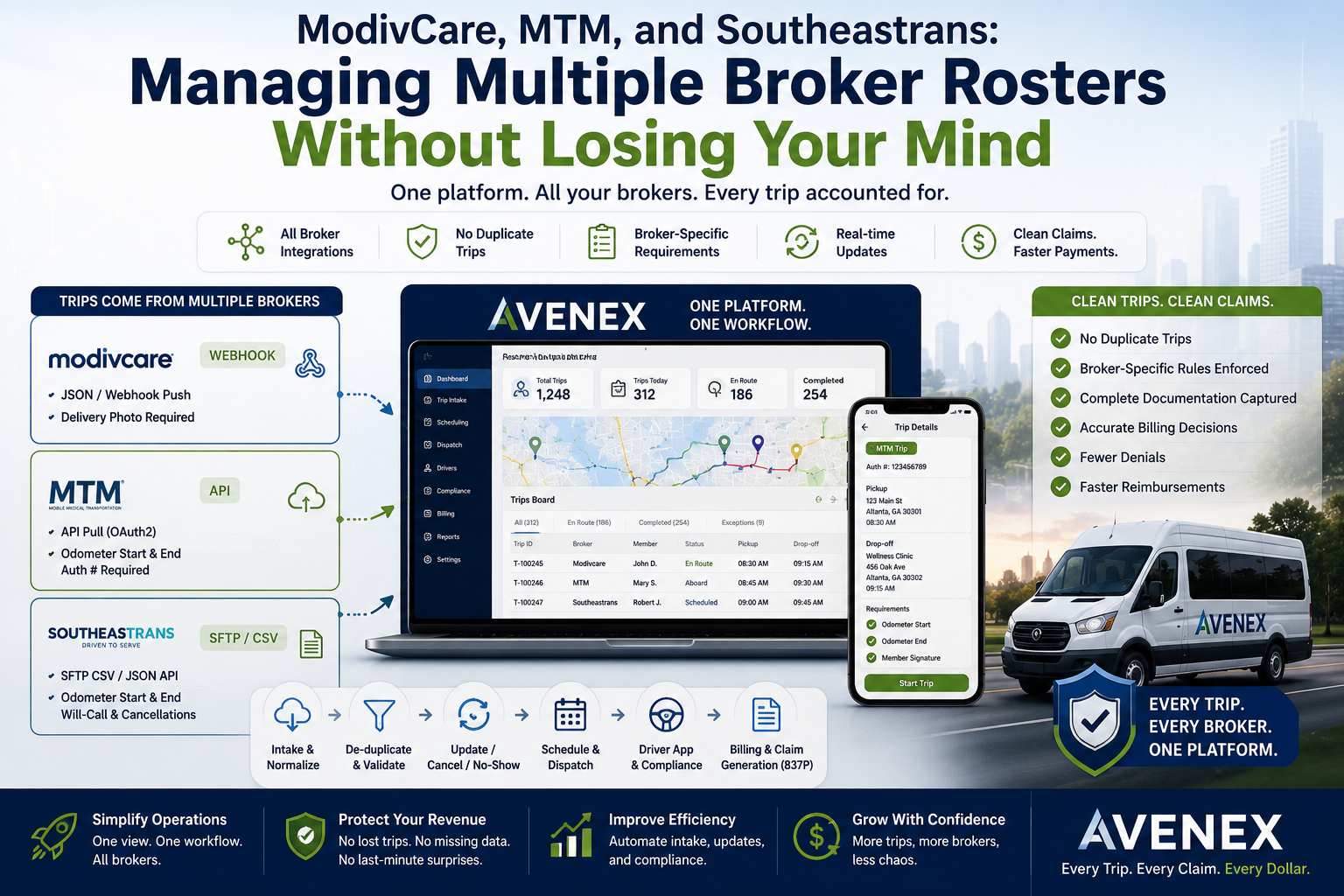
For an NEMT provider, working with multiple brokers can be a major source of business—and a major source of operational complexity.
A trip may arrive from one broker through a webhook, another through an API, and another as a CSV roster through SFTP. Each broker can have its own data format, mobility codes, delivery requirements, authorization rules, and billing expectations.
For the operations team, this creates a simple but frustrating reality:
The trip may look different depending on where it came from, even though your team still needs to manage it through the same transportation workflow.
This is where broker management becomes more than an integration problem.
It becomes a data consistency, dispatch, compliance, and billing problem.
A modern NEMT operation needs to answer a few important questions:
- Did the trip arrive successfully?
- Was it imported only once?
- Were updates and cancellations handled correctly?
- Does the driver know what the broker requires?
- Was the required documentation captured?
- Is the correct payer and procedure code attached?
- Can the completed trip become a clean claim?
The goal isn’t simply to connect to more brokers.
The goal is to make every broker feed behave like one clean operational workflow.
Why Multiple Broker Rosters Create So Much Complexity
NEMT providers rarely have the luxury of working with a single standardized trip format.
One broker may send structured data through an API. Another may push events through a webhook. Another may send a scheduled CSV roster.
Avenex’s product documentation identifies three primary ways broker trips can enter the platform:
- Webhook push
- API pull
- SFTP file drop
Regardless of the source, the trip needs to end up in a consistent format inside the provider’s workflow.
Without that normalization, dispatchers and billing teams can end up managing different processes for different brokers.
And that’s when the headaches begin.
The Real Problem Isn’t the Roster
A CSV file isn’t inherently difficult.
An API isn’t inherently difficult either.
The real challenge is what happens after the data arrives.
Consider a typical morning.
A provider receives:
- MTM trips through a webhook or API
- ModivCare trips through a webhook
- Southeastrans trips through an SFTP roster
Now imagine the broker resends part of a roster.
Or a trip gets cancelled.
Or a trip is updated.
Or a server becomes temporarily unavailable while a bulk roster is being processed.
If the system isn’t designed to handle those situations properly, the operations team can end up with duplicate trips, missing trips, outdated information, or manual reconciliation work.
Avenex addresses this with a persist-first intake approach, automatic de-duplication, retry queues, and action-aware imports for adds, updates, cancellations, and no-shows.
Three Brokers, Three Different Workflows
Understanding broker-specific requirements is essential.
MTM
According to Avenex’s current product configuration, MTM supports webhook push and API pull using OAuth2.
MTM trips also have specific driver-side requirements. At delivery, the driver must provide:
- Odometer start
- Odometer end
The MTM authorization number is also displayed on the odometer screen.
Avenex also uses level-of-service information to route trips to the appropriate MTM Standard or MTM STS plan, with the corresponding procedure code and EDI payer.
For a provider, the important lesson is simple:
The driver shouldn’t have to remember the MTM rules. The workflow should enforce them.
ModivCare
ModivCare uses webhook push in the Avenex integration configuration.
Its driver-side delivery requirement is different from MTM.
A delivery photo is required before the trip can be completed.
ModivCare payor routing also depends on mobility type, with standard and STS pathways configured accordingly.
Again, this demonstrates why a generic “complete trip” button isn’t enough.
The system needs to understand which broker the trip came from and what that broker requires.
Southeastrans
Southeastrans uses SFTP CSV pull and direct API through JSON in Avenex.
Its roster structure can include a 37-column format and multiple MOBILITY_TYPE values, including:
- WC
- AMB
- STR
- BAR
- PED
The integration also handles will-call and cancellation rows. At delivery, odometer start and end are required.
For an operations team, this means that the challenge isn’t simply “import the CSV.”
The system has to understand the data inside the roster and translate it into the same operational language used everywhere else.
One Provider. One Workflow. Multiple Brokers.
This is the key principle.
Your dispatch team shouldn’t need to think:
“This is an MTM trip, so I need to follow process A.”
Then:
“This is ModivCare, so I need process B.”
And later:
“This is a Southeastrans trip, so I need to open another system and check process C.”
The broker may be different.
The provider’s workflow shouldn’t be.
Avenex maps inbound webhook data, API responses, and CSV rows into common fields such as:
- Member information
- Addresses
- Mobility type
- Service level
- Appointment time
- Scheduled pickup time
- Direction
- Authorization number
- Will-call status
- Special instructions
- Add, update, cancel, and no-show actions
That normalization is what allows the operations team to work from one consistent system instead of managing separate broker workflows.
The First Rule: Never Lose the Original Trip
One of the most important principles in broker integration is persist first.
The system should save the inbound broker payload before attempting to transform or deliver it downstream.
Why does that matter?
Because integrations fail.
Servers go down.
Connections time out.
Files arrive while another service is unavailable.
A bulk roster can contain hundreds of trips.
If the system processes the data directly without first persisting it, a temporary failure can become a permanent missing trip.
Avenex’s workflow persists inbound payloads immediately and uses a retry queue when downstream services are unavailable.
This creates a much safer model:
Receive → Persist → Transform → Deliver → Monitor
rather than:
Receive → Hope everything works
The Second Rule: Don’t Let Broker Re-Sends Create Duplicate Trips
Broker systems may resend information.
That’s not necessarily an error.
The problem occurs when the receiving system treats every incoming record as a brand-new trip.
Avenex uses automatic de-duplication so that a broker re-sending the same roster does not create duplicate trips.
This is especially important for high-volume providers.
Imagine a roster containing hundreds of trips being sent again after a connection issue.
Without proper de-duplication, your dispatch board could suddenly contain duplicate rides.
Now the team has to determine:
- Which trip is real?
- Which one should be assigned?
- Which one should be cancelled?
- Which one should eventually be billed?
A good integration layer prevents the problem before it reaches the dispatcher.
The Third Rule: Treat Updates and Cancellations as First-Class Events
Broker integrations aren’t simply about adding trips.
Real-world trip data changes.
A trip can be:
- Added
- Updated
- Cancelled
- Marked as a no-show
Avenex’s broker intake workflow handles these actions through the same pipeline rather than treating them as separate manual processes.
This matters because outdated trip information can create operational and financial problems.
A cancelled ride shouldn’t remain on the dispatcher’s active board.
An updated pickup time shouldn’t remain buried in an email.
A no-show shouldn’t require someone to manually reconstruct what happened later.
The system should reflect the broker’s latest information.
The Fourth Rule: Broker Requirements Must Follow the Trip
One of the biggest operational risks occurs when broker requirements remain in someone’s memory instead of becoming part of the workflow.
For example:
MTM: Odometer start + end and authorization number.
ModivCare: Delivery photo.
Southeastrans: Odometer start + end.
Avenex’s Driver+ application applies broker-specific requirements during trip completion, while also supporting signature capture and other driver workflows.
This changes the driver’s experience from:
“Remember what this broker requires.”
to:
“The application tells you what is required before you can complete the trip.”
That’s a significant operational difference.
Why This Matters for Billing
Broker integration doesn’t end when the driver completes the trip.
That’s where billing begins.
If the broker data isn’t carried correctly through scheduling and delivery, the billing team may have to reconstruct the trip manually.
Avenex takes a different approach by locking key billing information at scheduling.
The platform snapshots:
- Payer plan
- Procedure code
- EDI payer ID
- Provider NPI
The billing decision is then carried forward to claim generation rather than being recomputed later.
When the trip is delivered, Avenex can automatically generate the EDI 837P claim using those stored values.
That creates a connected workflow:
Broker Roster → Scheduled Trip → Driver Compliance → Delivered Trip → EDI 837P
Instead of:
Broker Roster → Dispatch → Spreadsheet → Email → Billing Review → Manual Claim
What an Efficient Multi-Broker Workflow Looks Like
A mature NEMT operation should ideally follow a process like this:
1. Receive
Accept broker data through the appropriate integration method.
2. Persist
Store the original payload immediately.
3. Normalize
Convert different broker formats into a common trip structure.
4. De-duplicate
Prevent re-sent rosters from creating duplicate trips.
5. Apply Actions
Process adds, updates, cancellations, and no-shows.
6. Schedule
Validate eligibility, authorization, booking rules, and billing information.
7. Dispatch
Assign the appropriate driver and monitor the trip in real time.
8. Enforce Compliance
Require the broker-specific information needed for completion.
9. Deliver
Capture the required trip evidence.
10. Bill
Use the scheduled billing snapshot to create the claim.
This is the difference between managing broker files and managing a broker-connected transportation operation.
What Providers Should Look for in NEMT Broker Integration Software
If you’re evaluating NEMT technology, don’t stop at the question:
“Does the software integrate with my broker?”
Ask deeper questions.
Can it handle different intake methods?
Look for support for webhooks, APIs, and SFTP/CSV feeds.
What happens if the connection fails?
Ask whether incoming trips are persisted and automatically retried.
How does it prevent duplicates?
A re-sent roster shouldn’t create a second trip.
Can it process updates and cancellations?
A true integration should handle more than new trip creation.
Are broker requirements enforced?
The driver should know exactly what is required for that specific trip.
Does broker data flow into billing?
The integration should continue all the way through claim generation.
Can rules be changed without development?
Broker and payer requirements change. A configuration-driven system can reduce dependence on engineering releases. Avenex’s rules are designed to be editable from the admin interface and applied across web and mobile.
Managing Multiple Brokers Shouldn’t Mean Managing Multiple Systems
Working with ModivCare, MTM, Southeastrans, and other brokers is a normal part of NEMT operations.
The problem isn’t having multiple brokers.
The problem is allowing every broker to create a completely different operational process.
When broker integrations are standardized, the complexity moves away from the dispatcher and into the platform.
The result is a cleaner operational model:
Different brokers. Different formats. Different requirements. One workflow.
How Avenex Simplifies Multi-Broker NEMT Operations
Avenex is built around the idea that every broker should feed into one clean pipeline.
It supports broker connectivity through webhooks, APIs, and SFTP, normalizes inbound trip information, prevents duplicate imports, handles broker actions, and preserves inbound data for recovery.
From there, the same platform connects scheduling, dispatch, Driver+, compliance, and billing.
The driver sees the requirements relevant to the trip.
The dispatcher sees the trip in the same operational workflow.
The billing team receives the information needed to generate the claim.
And the provider doesn’t have to build a separate process around every broker.